



agent-desktop: Give Your AI Agent Real Computer Use — Without a Single Pixel of Screenshot Matching
Imagine telling an AI agent to "organize my Downloads folder," "fill out this government form in a native desktop app," or "click through the legacy CRM that has no API" — and having it actually do it, reliably, on macOS, Windows, and Linux alike. That is precisely the problem agent-desktop sets out to solve, and it is why this project from Vercel Labs rocketed to the top of GitHub's trending charts. Its pitch is deceptively simple: computer use for AI agents — see and operate desktop apps through the OS accessibility tree. No vision models guessing at coordinates. No brittle screenshot-and-pixel-matching pipelines. Just the structured, machine-readable view of the UI that your operating system already maintains, handed to your agent as clean JSON.
In a landscape where "computer use" demos still routinely break because a dialog shifted twelve pixels to the left, agent-desktop's approach feels like a course correction: it lets the agent read the same UI description that screen readers use, act on concrete element references, and then observe the result to verify its own work. The loop lives entirely in your agent — the tool itself contains no model at all.
What exactly is agent-desktop?
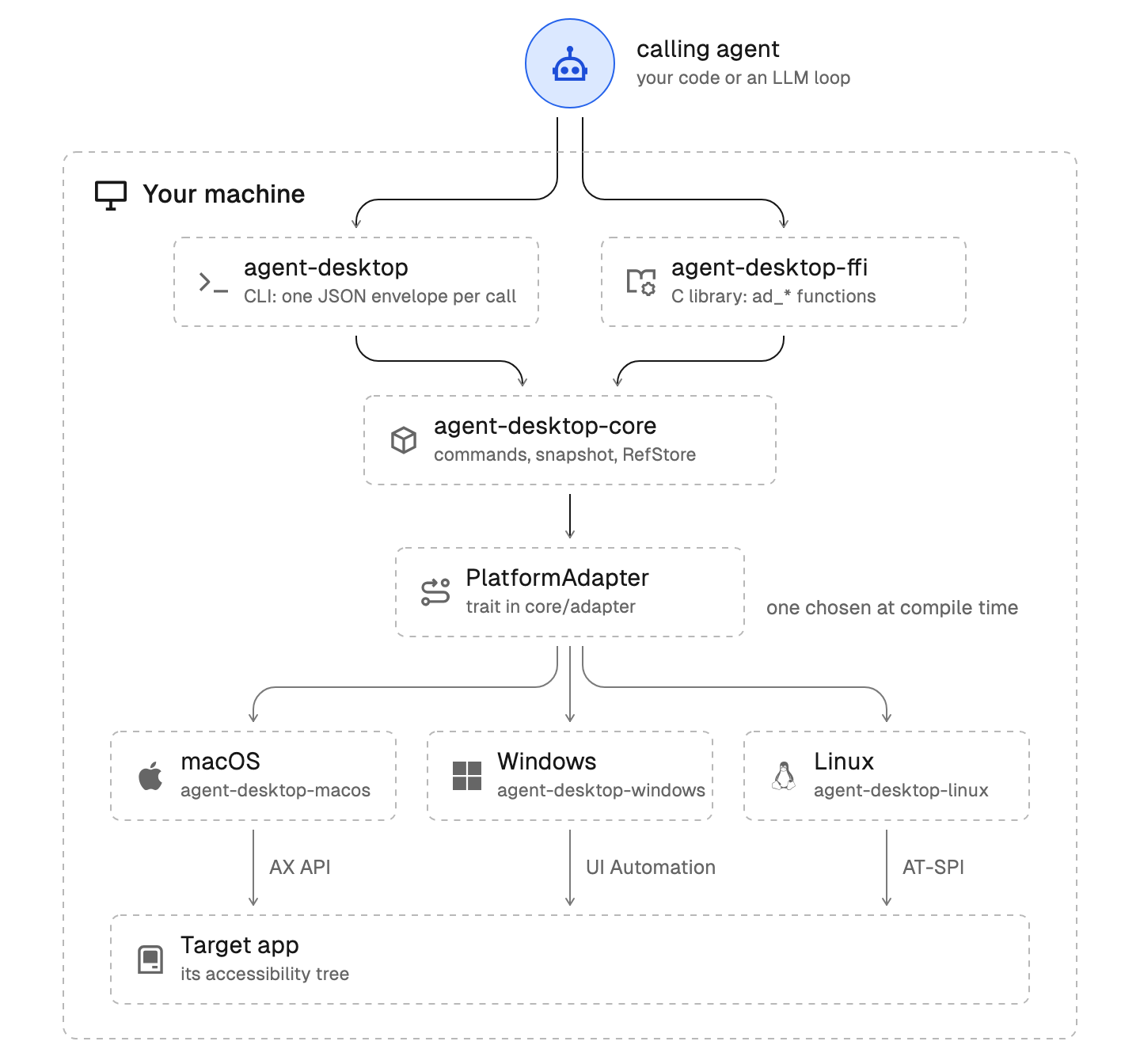
agent-desktop ships as two things in one package:
- A command-line tool that any agent (or human) can invoke: one command, one JSON envelope out.
- A C library (
libagent_desktop_ffi) for macOS, Linux, and Windows, so a program can call it in-process instead of spawning the CLI for every single command.
Under the hood, the binary is built per-OS and talks natively to that OS's accessibility API — the AX API on macOS, UI Automation on Windows, and AT-SPI on Linux. Whatever you point it at, the core flow is identical:
- Snapshot a window. You get back a JSON tree where every interactive element carries a
ref — a stable handle like @s8f3k2p9:e8.
- Act on a ref. Click it, type into it, toggle it, scroll it.
- Snapshot again to verify the UI actually changed the way you expected.
That observe → act → observe cycle is the entire philosophy. Because actions go through the accessibility API rather than synthesized mouse events, they are headless by default: nothing steals your cursor, no window jumps to the foreground. An agent can drive Finder or Excel while you keep working beside it. When you do need physical input (some games and canvas-style apps only respond to real events), a global --headed flag opts in.
Why this matters for the agent era
Most AI coding agents today live inside terminals and browsers because those two worlds expose their state cleanly: files, pipes, DOM trees. The desktop has been the locked room — thousands of perfectly good piece of software (photo editors, office suites, internal line-of-business apps, installers, system dialogs) simply cannot be used by an LLM.
Screenshot-based "computer use" is one answer, but it brings three painful costs: enormous token bills (every observation is a megapixel image), shaky accuracy (vision models misread small targets), and latency. agent-desktop offers the third path. A trimmed snapshot of a real Finder window looks like this — pure structured data an agent can parse in one cheap text call:
{
  "version": "2.6",
  "ok": true,
  "command": "snapshot",
  "data": {
    "app": "Finder",
    "snapshot_id": "s8f3k2p9",
    "ref_count": 59,
    "complete": true,
    "tree": {
      "role": "window",
      "name": "Downloads",
      "children": [
        { "role": "treeitem", "name": "Documents", "ref_id": "@s8f3k2p9:e8", "available_actions": ["Click"] }
      ]
    }
  }
}
Fifty-nine actionable elements, each with its role, name, ref, and the actions it supports — delivered as text. The project also bakes in the safety rails that experienced automation engineers fight for the hard way:
- Refs belong to their snapshot. A bare
@e8 is rejected with INVALID_ARGS. If the UI changed between your snapshot and your click, the action fails loudly with STALE_REF or AMBIGUOUS_TARGET instead of clicking something wrong — the agent simply takes a fresh snapshot and retries.
- Machine-readable error contract. Every command returns one envelope with
ok and either data or error; errors carry a code, a disposition, and usually a suggestion. The rule is crisp: retry only when error.disposition.retry is safe. An agent cannot misinterpret a Python traceback or a segfault; there is nothing to misinterpret.
- Privacy posture stated up front. Snapshots, clipboard reads, screenshots, and debug artifacts can contain private desktop content, and the project explicitly warns to keep them out of public logs and uploads.
Real-world scenarios where agent-desktop shines
Here are the kinds of workloads this unlocks the day you install it:
- Agentic office automation. An orchestration agent uses
snapshot, type, and click to fill native forms, rename batch files in Finder/Explorer (set-value, double-click, press), or export a spreadsheet — tasks no web API covers.
- Testing macOS and Windows apps. QA pipelines can drive any GUI application through the same command vocabulary, verify state with
get/is, capture evidence with screenshot, and record sessions with trace — without the flake of coordinate-based tools.
- MCP for desktop control. A single line wires the whole 50-plus command surface into Claude Desktop, Cursor, or any MCP client. Every command becomes a tool (
desktop_snapshot, desktop_click, desktop_session_start) returning its JSON envelope, and global flags such as --session, --headed, or --trace passed to mcp apply to every call. This is the fastest path from "zero" to "my coding agent can operate my computer."
- Accessibility-driven assistive tech. Screen-reader style functionality — describe a window, jump to a control, announce changes — becomes a
snapshot away for anyone building accessibility tools on macOS, Windows, or Linux (Ubuntu 24.04+, X11 or Wayland).
- Desktop RPA without the RPAtax. Legacy internal apps that predate APIs get agent-accessible without custom integrations:
launch the app, list-windows, snapshot, act. Window management (focus-window, resize-window, minimize, maximize), notifications (list-notifications, dismiss-notification), and clipboard (clipboard-get/clipboard-set) round out the automation toolbox.
- Dense-app exploration. Chat apps with thousands of nodes? Map first with
snapshot --skeleton --app Slack -i --compact, then drill into one region with snapshot --root @s8f3k2p9:e3 -i --compact. The find/get/is commands let agents search the tree instead of eating it whole.
Getting started in five minutes
1. Install
One npm command covers all three platforms (x64 and ARM64, native binaries and platform helpers included):
npm install -g agent-desktop
agent-desktop status                # platform, permissions, supported surfaces
agent-desktop permissions --guide   # macOS: walks you through the Accessibility grant
Bun, Yarn, and pnpm install the same package. If you want a pure binary with no JavaScript launcher at all, grab the matching native archive from GitHub Releases and keep its helper beside the executable. Platform requirements worth knowing: macOS needs the Accessibility permission (agent-desktop permissions --guide walks you through it), Windows needs no special grant for apps at your terminal's integrity level, and Linux needs your graphical session with at-spi2-core running.
2. Drive an app: observe → act → verify
agent-desktop snapshot --app Finder -i      # interactive elements, each with a ref
agent-desktop click @s8f3k2p9:e8            # act on a ref from that snapshot
agent-desktop snapshot --app Finder -i      # observe again to verify
Three commands and your agent has seen, touched, and confirmed a real desktop application. If the app has several windows, an ambiguous action reports the candidate window IDs in error.details — pass the right one via --window-id. A practical gotcha for Windows users: in PowerShell, always quote refs ('@s8f3k2p9:e8'), because a bare @token means the splatting operator.
3. Hand the whole loop to your agent
The binary carries its own version-matched documentation, so an agent can teach itself before acting:
agent-desktop skills get desktop      # the loop, refs, verification and retry rules
agent-desktop skills get platform     # what differs on the OS you run on
agent-desktop <command> --help        # flags for one command
Install the skill directly into an agent harness from skills.sh:
npx skills add <https://github.com/vercel-labs/agent-desktop> --skill agent-desktop
Or drop this into your AGENTS.md and let any coding agent self-serve:
Use agent-desktop to see and operate desktop apps. Before the first use, run agent-desktop skills get desktop and agent-desktop skills get platform, and follow them.
For MCP-capable clients, register the server once:
{ "mcpServers": { "agent-desktop": { "command": "agent-desktop", "args": ["mcp"] } } }
4. Go beyond the CLI when you need speed
When you are building a high-frequency integration — say, a polling automation that inspects a window every second — spawning a process per command is wasteful. Each release therefore also ships libagent_desktop_ffi. Here is a minimal in-process smoke test from Python, exactly as documented in the project:
import ctypes
lib = ctypes.CDLL("./lib/libagent_desktop_ffi.dylib")
lib.ad_adapter_create.restype = ctypes.c_void_p
lib.ad_adapter_destroy.argtypes = [ctypes.c_void_p]
assert lib.ad_init(7) == 0  # AD_RESULT_OK when the header's AD_ABI_VERSION_MAJOR matches the library
adapter = lib.ad_adapter_create()
lib.ad_adapter_destroy(adapter)
The FFI guide (agent-desktop skills get ffi) covers entry points, memory ownership, and threading rules for production use.
How much surface does it actually cover?
agent-desktop ships 60 command names — 56 operational commands plus four held-input commands (key-down, key-up, mouse-down, mouse-up) that deliberately refuse to run until a daemon can guarantee a held key or button gets released (a small design decision that quietly prevents so many automation horror stories). The command groups read like a comprehensive map of desktop automation:
| Group | Commands | | --- | --- | | Observe | snapshot, find, get, is, screenshot, list-surfaces | | Act on a ref | click, double-click, triple-click, right-click, type, set-value, clear, focus, select, toggle, check, uncheck, expand, collapse, scroll, scroll-to | | Keyboard and mouse | press, hover, drag, mouse-move, mouse-click, mouse-wheel, key-down, key-up, mouse-down, mouse-up | | Apps and windows | launch, close-app, list-apps, list-windows, list-displays, focus-window, resize-window, move-window, minimize, maximize, restore, open-system-surface | | Notifications | list-notifications
, dismiss-notification, dismiss-all-notifications, notification-action | | Clipboard | clipboard-get, clipboard-set, clipboard-clear | | Wait | wait | | Sessions | session, trace, cursor-overlay | | System | status, permissions, version, batch, skills |
Platform support is mapped out with unusual honesty — each capability is marked per-OS, including what works headless, what needs --headed, and what refuses outright. The Windows surface notes and the Linux X11 versus Wayland caveats are documented in the installation guide, and agent-desktop skills get platform prints the full capability table for the OS you are actually sitting on.
A fair warning before you point it at production machines: by design, an agent that can click any ref can do what a logged-in user does. The README itself reminds you that snapshots, clipboard reads, screenshots, command output, and debug artifacts can contain private desktop content, and they should stay out of public logs and uploads. Anything you can automate, you can automate badly — run it against scoped accounts first.
How the project is built
agent-desktop is a Rust workspace (with its C FFI) where each platform adapter builds only on its own OS, so the project scopes its checks per host:
HOST_PKGS=(-p agent-desktop-core -p agent-desktop-macos -p agent-desktop -p agent-desktop-ffi)
cargo test "${HOST_PKGS[@]}"
cargo clippy "${HOST_PKGS[@]}" --all-targets -- -D warnings
On Windows, you swap agent-desktop-macos for agent-desktop-windows in that list; on Linux, for agent-desktop-linux. The repo also keeps engineering rules (AGENTS.md), a vocabulary of core concepts like refs, snapshots, and sessions (CONCEPTS.md), and a docs/solutions/ archive of past bugs and lessons — a culture detail worth noting when you evaluate whether a young project can mature quickly. Licensing is the maximally friendly Apache-2.0, and there are no paid tiers, no hosted dependency, and no account requirement: it is a tool, not a service.
Similar projects to know
The "computer use" space is heating up, and a few neighbors help you appreciate what agent-desktop optimizes for:
- Anthropic Computer Use (the vision-loop that popularized "agent looks at screenshot, moves cursor, types") works with any UI a model can see, including canvas-based apps that publish no accessibility tree, and it needs no per-OS integration layer — but as the agent-desktop design argument goes, screenshot loops spend vision tokens on every observation, re-recognize the world at each step, and offer no structured state to verify a click against. agent-desktop takes the opposite trade: no vision cost, deterministic structured JSON, explicit stale-reference errors instead of silent misclicks, at the price of only working with apps that expose their UI to the OS accessibility layer.
- thedotmack/claude-mem (ranked 2 on the same trending list) tackles agent capability from a different angle entirely — instead of giving agents hands on the desktop, it gives them a persistent memory layer for their sessions. The two are complementary: claude-mem remembers what was done; agent-desktop actually does it.
- Playwright and Puppeteer dominate browser automation by reading the DOM, so agents and pipelines can drive
page.locator targets just as deterministically as refs — but they stop at browser boundaries and know nothing about native window managers, notifications, or Finder. agent-desktop is the accessibility-tree equivalent expanded to the whole desktop. If agent-browser.dev's project family is any indication, these worlds mesh rather than compete.
The bottom line
agent-desktop arrives at exactly the moment developers are asking "why can't my agent just use the computer?" — and answers with the least glamorous, most correct technology available: read what the OS already knows, hand it over as JSON, refuse to guess. If you build agents, automations, or test pipelines that keep dying at the browser/tab boundary, install it, point your MCP client at agent-desktop mcp, and let your agent operate @s8f3k2p9:e8 instead of squinting at pixels.
📦 Project: https://github.com/vercel-labs/agent-desktop — Apache-2.0, macOS 13+ / Windows 10 1809+ / Ubuntu 24.04+, install via npm install -g agent-desktop.

