
Six Tiny Tools Worth Your Afternoon: A Menu-Bar Usage Meter, an On-Device Android Agent, a Hacker-News YouTube, and Four More Finds from This Week's Tool Shelf
The best software discoveries rarely come from launch keynotes. They come from the "潮流工具" (trending tools) section of weekly digests — those short, opinionated paragraphs where an engineer writes "I actually use this" about something that shipped eleven days ago. This article gathers six such picks from this week's issue of the Tw93 潮流周刊 (Issue 288), plus one bonus recipe you can paste to your own coding agent. All six are tools you can try within the hour; most are free; together they sketch where the edges of everyday developer tooling are moving: toward menu-bar transparency for AI usage, toward on-device agents, and toward taste-aware coding skills.
Let's take them one by one, with what each does, when you'd reach for it, and how to start.
1. Maple — six Chrome extensions, two of them homemade, one of them about hiding your bookmarks

Start with the meta-look: an engineer publishing the six extensions they actually keep installed is one of the most honest recommendation formats in software. The list, from the Maple project's README (github.com/tw93/Maple):
- Maple Bookmarks (by the author): hides your bookmark bar entirely and summons your bookmarks via a keyboard shortcut instead. The stated philosophy — "the most simple way to keep it most simple." If you've ever stared at fifteen favicon folders you never open, this is a decluttering bet: the bar disappears until you summon it.
- Maple NewTab (also by the author): replaces the new-tab page with one painting per day, the quiet kind of upgrade that makes opening a tab slightly nicer. A running joke in the community is that "NewTab is one of the most brutal competition areas of the last decade; you've seen ten apps promising the same."
- Minimal Theme for Twitter/X: the "must-install for X power users" choice. This strips the default UI chrome — the algorithmic "For you" noise, the recommendation rails — back down to a pure timeline. The reason: reading your following list is a deliberate activity in 2026, not a scroll reflex, and this is a theme, not a bot, so it doesn't touch your account.
- PWA Install Block: web apps keep shoving an "install app" button into the address bar; this one hides those buttons, period.
- uBlock Origin Lite: called out as the best-performing and most reliable content blocker, the Adblock-era survivor you install once and forget — the reason it survives is that it respects both the page's own layout and your network's bandwidth.
- WebRTC Control: the privacy pick of the group. WebRTC's local-IP leak can expose your real LAN/WAN address even when you browse through a proxy; this extension lets you disable it at the click of a button on demand. A quiet, high-value fix for people who route traffic on purpose.
Notice the pattern: none of these add features. Five of six subtract noise — hidden chrome, hidden prompts, hidden trackers, hidden leaks. That is the current golden age of small utilities: the winning micro-SaaS-shaped tool is often a subtraction machine.
2. OpenUsage — see every AI plan's remaining meter, in your menu bar
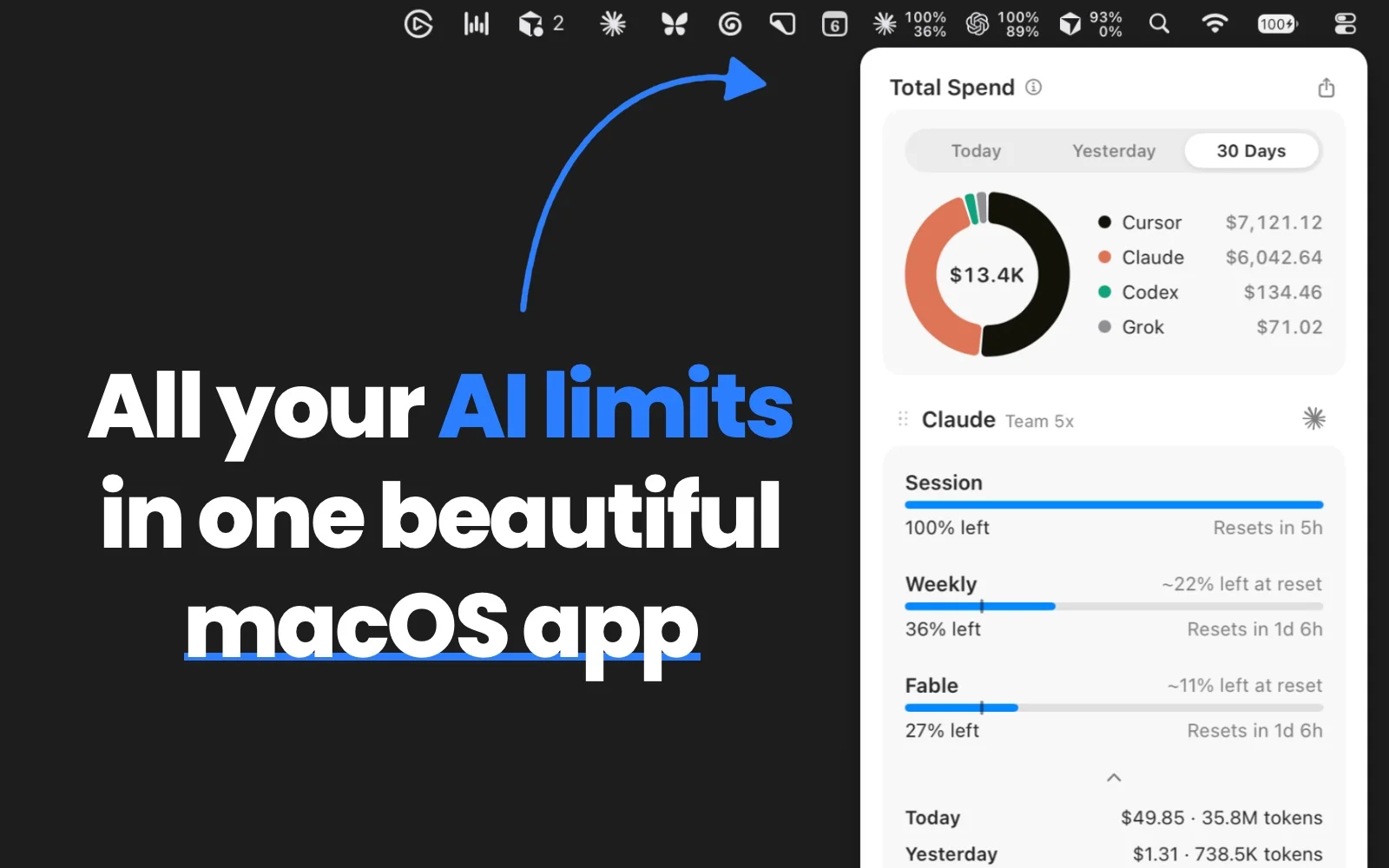
If you use several frontier coding assistants — Claude Code, Codex, Gemini, and friends across different subscription plans — your usage limits are scattered across at least three status pages. OpenUsage (github.com/robinebers/openusage) puts them on one macOS menu bar: usage, quota, and reset countdowns for the models you're actually paying for, checked locally at intervals you control.
Why this tool exists now: agent workflows have made quota consumption non-linear. One long refactor session can eat half of a plan's weekly allowance, and the failure mode — a hard stop mid-task — always lands at the worst moment. A tiny always-visible meter converts that ambush into a routine glance. The reviewer's verdict from the weekly: "it's done beautifully, quite clean, and if you're the type who keeps trying agent workflows, it's worth reaching for." You get the same data as the official status pages — you just see it before you run out instead of after.
It is the menu-bar successor to the older Terminal-based "ccusage" wave: same goal, zero terminal required.
3. Mika — an on-device AI agent for Android that works in the background
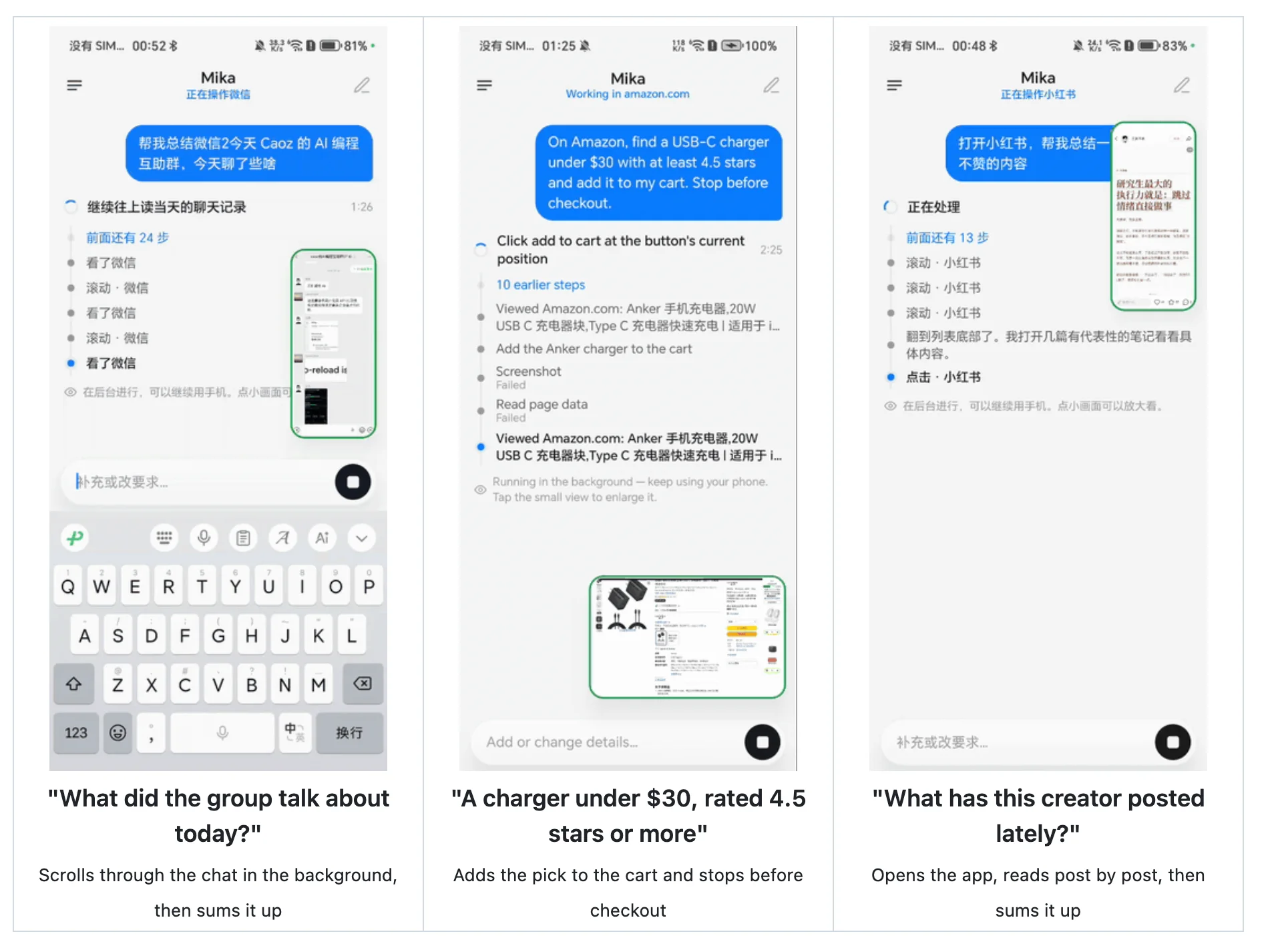
Desktop agents had a head start; phone-side device agents are this year's land-grab. Mika (github.com/wangzan101/Mika) is an Android device-side agent whose defining behavior: it doesn't occupy your screen. It calls Android's own capabilities in the background to get things done while you keep using your phone normally.
Two trends make it notable beyond a single open-source repo. First, frontier models (the weekly mentions Claude Opus-class capability on device orchestration) have gotten strong enough to sequence multi-step on-device actions reliably. Second — this is a genuine architectural shift — phone OSes like iOS (Apple Intelligence-style on-device model) or Android (AppFunctions API, Gemini Nano) are now exposing their own APIs to third-party agents, so an agent no longer needs to brute-force the UI to use the device; it can drive installed apps and system functions. The practical reading for the curious: install Mika on a spare device, grant it the notifications/accessibility surfaces it needs, and let one of those background task flows — set a reminder from a chat screenshot, summarize an article, post to a social app — run while you keep using the phone normally; it's also the closest way to feel where mobile agents are heading with your own hands, while staying fully open-source about it.
4. HackerTube — Karpathy got annoyed at YouTube's recommendations, shipped a fix in two hours
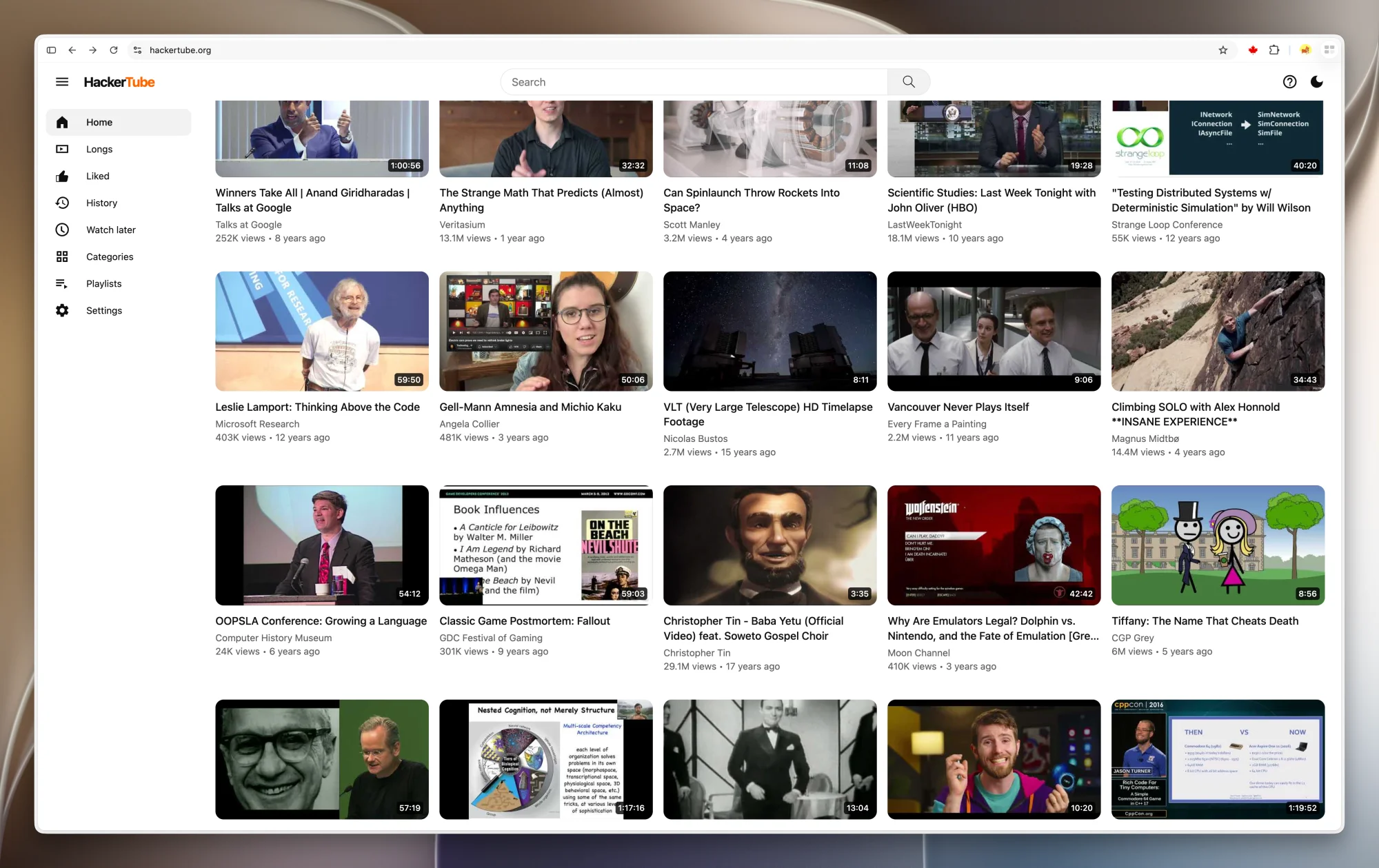
The story sells it: Andrej Karpathy, mildly furious that YouTube's recommender hides the good technical talks he actually cares about, spent his Saturday having an agent (the weekly says Opus-class) sweep about 40,000 link-bearing comments across Hacker News's decade of history, extract every recommended video, and rank them into a browsable homepage: hackertube.org. Total build time, per the retelling: roughly two hours of agent babysitting.
What it is to use: a YouTube-shaped front page composed entirely from human-curated-in-the-wild links — HN discussions are effectively a crowd-sourced review filter, and the videos worth pasting into a decade-old comment thread clear an astonishing quality bar by survivorship alone. Open it, click something, YouTube serves the video itself (with its normal player and your normal account) — this is a recommendation funnel, not a walled garden.
And it happens to be the best non-marketing pitch of 2026 for what people quietly mean by "agentic coding": a personal, high-taste dataset built by an agent in one weekend, replacing a billion-dollar recommender for one reader's niche. When someone asks "what are agents actually good at," HackerTube is the answer — the code didn't ship as a product; the attention did.
5. TokenEconomizer — Microsoft × Berkeley: teach an agent to shrink its own context

Token bill fatigue is now a real engineering budget line. TokenEconomizer (github.com/microsoft/TokenEconomizer) is a collaboration between Microsoft and UC Berkeley built on one elegant idea: the strongest source of context-window savings is the repository's own history. The plugin mines accumulated agent experience in your current repo and uses it to compress the context your agent loads — fewer consumed tokens on the same task, and it keeps learning as it sees your team work more.
Why the approach matters more than the plugin: naive token saving (aggressive truncation, fewer retrieved files) saves money by making the agent dumber. The experience-driven approach flips the axis — the agent skips re-discovering facts it already verified in this repo, which saves tokens and makes the next session faster, because rediscovery is exactly what wastes budget in long-running projects. It's worth installing in any project where the same investigation happens more than twice per week; if your sessions spend most tokens asking "what is the architecture of this thing," that's your answer.
6. (Bonus recipe) 21 AI-coding best practices from the same author
One of the two best entries in issue 288 isn't a tool at all: it's the author's own distillation — "21 Best Practices for AI Coding in 2026" (tw93.fun/2026-10-29/practice.html), written as rules you and your agent can both learn from. The framing: "if I could pour my AI-coding experience into reusable practice rules, what would they look like?" — he spent an afternoon hand-tuning them, which fits the spirit of this whole list: hand-collected, human-tested, lightly opinionated.
Alongside it, a paste-ready prompt: "Help me speed up the CI in this repo" — a full 10-step workflow to hand to your coding agent: use the gh CLI to time-box the last 50 CI runs into queue / setup / test phases, set cancel-in-progress on PR branches but never on main, skip docs-only commits with paths-ignore, prefer built-in caches of setup-* actions, download prebuilt binaries instead of compiling on the runner, parallelize jobs, and end with a before/after timing comparison. Anyone whose CI takes 20 minutes for a README typo will feel the value in one prompt's worth of work.
The meta-skill: how to curate your own tool shelf
Every item above was found the same way — a human who actually kept it installed, describing in two sentences where it fits in their day. That is curatorial methodology, not just content, and it's directly copyable. If you want to build your own trusted-tools habit (for yourself, your team's wiki, or your own digest), run these four passes quarterly:
- The glance test. Would you notice a problem without deliberately seeking it? A menu-bar quota meter passes; a status page you must remember to visit never really lives in your working memory. Ambient visibility beats willpower.
- The subtraction test. Before adding a tool, name the noise or chore it removes, in one sentence. Maple's five noise-canceling extensions are the exemplar; anything whose benefit you can't phrase subtractively is probably shelfware.
- The replacement-ownership test. If this tool stopped updating tomorrow, what breaks and who takes over? Homegrown picks (Maple Bookmarks, one-time-purchase utilities like Beaming's cousin on the weekly's sponsor rail) pass because the failure surface is tiny; dependency-heavy picks need a backup plan.
- The one-week grace hatch. Install candidates in a dated folder — browser profiles, disabled extensions, a "trial" window — and let them graduate by usage frequency, not by how impressive their launch copy read. OpenUsage only earns its menu-bar slot after your third genuine glance.
The weekly format works precisely because it's already this filter: the tools below survived somebody's Tuesday, not somebody's launch checklist.
Why small tools keep winning
Viewed together, these six picks share a worldview: software is getting big enough that the highest-value tools now manage the side effects of that bigness — visibility into usage limits (OpenUsage), escape from recommender algorithms (HackerTube), UI and network noise removal (Maple's half-dozen), context and budget discipline (TokenEconomizer), and the OS-level abstraction for agents to finish the abstraction (Mika). Building or adopting along the seams is currently far more efficient than fighting in the cores, and the community's favorite tools this fall are the ones quietly living in the menu bar, the background, and the address bar. As Karpathy's weekend project proves: the next useful product might just be a Saturday, plus your own taste, plus an agent with permission to go through ten years of comment history.
Originally curated in 潮流周刊 (Trend Weekly), Issue 288 — a weekly human-filtered digest of practical tools and engineering reading.

